Turning Season Stats Into a Lacrosse Recruiting Profile
A coach's guide to lacrosse recruiting stats: which numbers matter for each position, where the season data already lives, and how to send it.
By Dave Demuth, Founder
Your senior attackman wants to email three college coaches this weekend, and he's asking you what numbers to put in the message. Lacrosse recruiting stats work best when they are specific, position relevant, and easy to scan in the few seconds a coach spends on an unsolicited email. That means two or three standout numbers, not a season's worth of raw totals, matched to what a coach actually recruits for at that position.
What Belongs on a Lacrosse Recruiting Stat Sheet?
NCSA's recruiting guide puts identity first: name, high school, graduation year, position, physical measurables like height and weight, and GPA or test scores, with a highlight video attached (NCSA). The stats come second.
Keep that stats section short once you get to it. USA Lacrosse's recruiting guidance tells players to send coaches updated athletic and academic numbers alongside a highlight video, academic information, and a personal statement, not a full spreadsheet of season totals (USA Lacrosse). Two or three numbers that describe what the player does well beat a full stat line a coach has to interpret alone.
Which Stats Matter for Each Position?
Attack and midfield players get judged on scoring, so goals, assists, points, and shooting percentage carry the most weight. Defensive players and long-stick middies get judged on what they take away rather than what they prevent, which makes caused turnovers and ground balls the numbers worth leading with. A goalie's save percentage means little on its own, since a handful of saves in a low-shot game inflates the number the same way a small sample skews a faceoff or draw win percentage. Pick the two stats that actually match the player's role, and lead the email with those instead of a full box score.
Where Your Season Stats Already Live
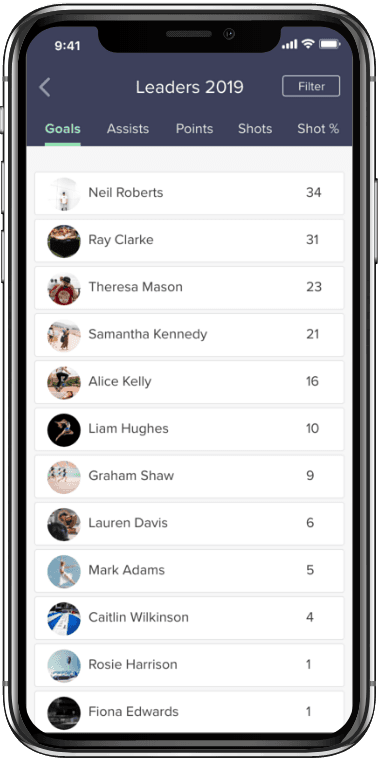
Every game your team tracks in the SquadProfile mobile app records each player's line for that game: goals, assists, shots on goal, ground balls, saves. Those per-player, per-game numbers are what build the season totals on your team's Dashboard once a game is entered.
The Analytics section on that dashboard shows your team's season shooting percentage, shots on goal percentage, assisted goals percentage, clear percentage, and save percentage, along with turnovers and ground balls per game. The Leaders section below it shows which player currently sits on top of each stat category, listed by name, jersey number, and position.
How Do You Pull a Player's Full Season Line?
Start with what the Leaders board already tells you. If your player leads the team in ground balls or caused turnovers, that number already has a name attached to it and is ready to drop straight into an email. For a player who isn't at the top of a category yet, the same process still works: add up their per-game numbers across every completed game to build the season total by hand.
Because every game lives inside your team's season record, you can go back to any game your team tracked and pull the numbers from there instead of relying on memory from partway through the season. If you're a parent putting the profile together rather than the coach, ask whoever runs the team's account for those season splits. They're the one with access to the full dashboard.
The Highlight Video Still Matters
A strong stat sheet gets an email opened, and a highlight video is what keeps a coach watching after that. NCSA recommends keeping a men's lacrosse highlight video under four minutes, built from 20 to 30 plays that show a range of skills against real competition, using mostly game footage instead of isolated drills (NCSA).
Pair that footage with the stats from a game where the player actually performed well. A three-goal game against a strong opponent, matched with the clip of those goals, tells a fuller story than either one alone. For a broader sense of where a player's shots are actually landing across a season, reading your team's shooting chart is worth pulling up before you decide which games to draw footage from.
Sending It to a Coach
Keep the message itself short. NCSA's guide to emailing college coaches recommends including the player's name, location, graduation year, position, and a link to the highlight video, with a subject line between 50 and 75 characters that packs in the name, grad year, position, and a stat (NCSA).
The same discipline applies whether you track for a boys' program with faceoffs and rides or a girls' program with draws and 8-meter opportunities, and either set of season numbers is covered on the men's lacrosse and women's lacrosse stat pages if you want to double check a definition before it goes in an email. A follow-up after two or three weeks with one new stat or clip from the most recent game keeps the conversation open without feeling pushy. Pull it from the same season data already sitting in the dashboard.
See you on the sideline.
Dave Demuth
Founder, SquadProfile